
Sometimes, when doing integration, we need to import attachments to Oracle ERP Cloud.
Oracle ERP Cloud have a common import framework for ERP/SCM Cloud.
We can find the attachment context using following SQL or Oracle Doc 2369923.1
SELECT * FROM FUN_ERP_ATTACHMENT_CONTEXTS
Take AR for example, we can get the SQL defined here for the AR attachment.
The :1, :2, :3, :4 are the keys we need to provide in the web service payload when calling the attachment service:
SELECT ARC.CUSTOMER_TRX_ID FROM RA_CUSTOMER_TRX_ALL ARC, RA_BATCH_SOURCES_ALL BS
WHERE
ORG_ID = (SELECT BU_ID FROM FUN_ALL_BUSINESS_UNITS_V WHERE BU_NAME = :1)
AND TRX_NUMBER = :2 AND ARC.BATCH_SOURCE_SEQ_ID = BS.BATCH_SOURCE_SEQ_ID
AND BS.SET_ID IN (FND_SetID_Utility.getSetID('AR_TRANSACTION_SOURCE','BU',ARC.ORG_ID), 0)
AND BS.NAME = :3 AND ARC.CUSTOMER_TRX_ID = NVL(:4, ARC. CUSTOMER_TRX_ID)
The import url is similar to following:
https://%5BYOUR_ERP_INSTANCE%5D:443/fscmService/ErpObjectAttachmentService
Following is an example of the payload that we use to import an attachment to an exiting AR Invoices – UserKeyB and UserKeyD needs be populate correctly for the system to find the existing Invoice. Also file contents are encoded to BASE64 string.
<soapenv:Envelope xmlns:soapenv="http://schemas.xmlsoap.org/soap/envelope/"
xmlns:typ="http://xmlns.oracle.com/apps/financials/commonModules/shared/model/erpIntegrationService/types/"
xmlns:erp="http://xmlns.oracle.com/apps/financials/commonModules/shared/model/erpIntegrationService/">
<soapenv:Header/>
<soapenv:Body>
<typ:uploadAttachment>
<typ:entityName>RA_CUSTOMER_TRX_ALL</typ:entityName>
<typ:categoryName>CUSTOMER_TRX</typ:categoryName>
<typ:allowDuplicate>yes</typ:allowDuplicate>
<!--Zero or more repetitions:-->
<typ:attachmentRows>
<!--Optional:-->
<erp:UserKeyA>US1 Business Unit</erp:UserKeyA>
<!--Optional:-->
<erp:UserKeyB>88380</erp:UserKeyB>
<!--Optional:-->
<erp:UserKeyC>Distributed Order Orchestration</erp:UserKeyC>
<!--Optional:-->
<erp:UserKeyD>667110</erp:UserKeyD>
<!--Optional:-->
<erp:UserKeyE></erp:UserKeyE>
<!--Optional:-->
<erp:AttachmentType>File</erp:AttachmentType>
<!--Optional:-->
<erp:Title>HelloWorld</erp:Title>
<!--Optional:-->
<erp:Content>aGVsbG93b3JsZA==</erp:Content>
</typ:attachmentRows>
</typ:uploadAttachment>
</soapenv:Body>
</soapenv:Envelope>
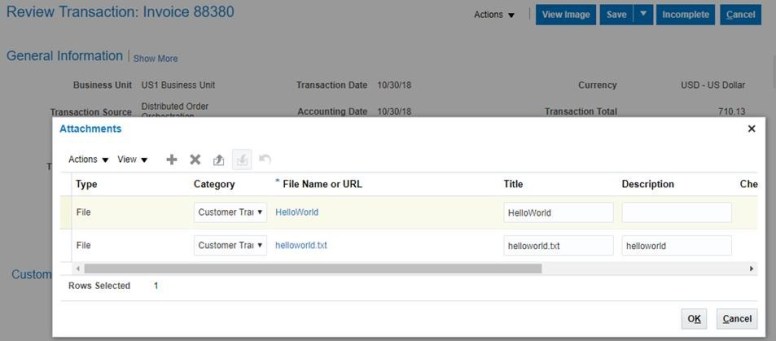
After import, we can see following file was attached to the AR Invoice
 Zhi Yan Blog