Xml Helper Class for Groovy / Java

Using the standard java XML library could be a little bit complex, especially when you just want a quick handling of XML files and don’t want to dive deep into the codes that parse it.

Following code provides a wrapped helper class which helps to do this.


import java.io.ByteArrayInputStream;
import java.io.File;
import java.io.FileInputStream;
import java.io.IOException;
import java.io.InputStream;

import java.io.StringWriter;
import java.io.Writer;

import javax.xml.parsers.DocumentBuilder;
import javax.xml.parsers.DocumentBuilderFactory;
import javax.xml.transform.OutputKeys;
import javax.xml.transform.Transformer;
import javax.xml.transform.TransformerFactory;
import javax.xml.transform.dom.DOMSource;
import javax.xml.transform.stream.StreamResult;
import javax.xml.xpath.XPath;
import javax.xml.xpath.XPathConstants;
import javax.xml.xpath.XPathFactory;

import org.w3c.dom.Document;
import org.w3c.dom.Node;
import org.w3c.dom.NodeList;

public class XmlUtil {
public static Document getXmlDocumentByString(String xmlString) {
Document doc = null;
try {
InputStream is = new ByteArrayInputStream(xmlString.getBytes());

DocumentBuilderFactory dbFactory = DocumentBuilderFactory.newInstance();
dbFactory.setNamespaceAware(false);
DocumentBuilder dBuilder = dbFactory.newDocumentBuilder();
doc = dBuilder.parse(is);

} catch (Exception ex) {
ex.printStackTrace();
}
return doc;
}

public static Document getXmlDocumentByBytes(byte[] inputBytes) {
Document doc = null;
try {
InputStream is = new ByteArrayInputStream(inputBytes);

DocumentBuilderFactory dbFactory = DocumentBuilderFactory.newInstance();
dbFactory.setNamespaceAware(false);
DocumentBuilder dBuilder = dbFactory.newDocumentBuilder();
doc = dBuilder.parse(is);

} catch (Exception ex) {
ex.printStackTrace();
}
return doc;
}

public static NodeList getXmlNodeListByXPath(Document doc, String xpath) throws Exception {
XPath xPath = XPathFactory.newInstance().newXPath();
return (NodeList) xPath.compile(xpath).evaluate(doc, XPathConstants.NODESET);
}

public static NodeList getXmlNodeListByXPath(Node node, String xpath) throws Exception {
XPath xPath = XPathFactory.newInstance().newXPath();
return (NodeList) xPath.compile(xpath).evaluate(node, XPathConstants.NODESET);
}

public static Node getXmlNodeByXPath(Node node, String xpath) throws Exception {
XPath xPath = XPathFactory.newInstance().newXPath();
return (Node) xPath.compile(xpath).evaluate(node, XPathConstants.NODE);
}

public static Document removeNodesByTag(Document xmlDoc, String nodeTag) {
NodeList nl = xmlDoc.getElementsByTagName(nodeTag);
for (int i = nl.getLength() - 1; i >= 0; i--) {
Node n = nl.item(i);
n.getParentNode().removeChild(n);
}

return xmlDoc;
}

public static String prettyPrint(Document xml) throws Exception {
Transformer tf = TransformerFactory.newInstance().newTransformer();
tf.setOutputProperty(OutputKeys.ENCODING, "UTF-8");
tf.setOutputProperty(OutputKeys.INDENT, "yes");
Writer out = new StringWriter();
tf.transform(new DOMSource(xml), new StreamResult(out));
return out.toString();
}

// following file exscapes the xml specific chars inside the string.
public static String escapeXml(String s) {
return s.replaceAll("&", "&")
.replaceAll(">", ">")
.replaceAll("<", "<")
.replaceAll("\"", """)
.replaceAll("'", "'");
}

public static byte[] readBytesFromFile(String filePath) {

FileInputStream fileInputStream = null;
byte[] bytesArray = null;
try {

File file = new File(filePath);
bytesArray = new byte[(int) file.length()];

//read file into bytes[]
fileInputStream = new FileInputStream(file);
fileInputStream.read(bytesArray);

} catch (IOException e) {
e.printStackTrace();
} finally {
if (fileInputStream != null) {
try {
fileInputStream.close();
} catch (IOException e) {
e.printStackTrace();
}
}
}
return bytesArray;
}
}
 

How to get Oracle ERP Cloud BI Publisher Reports by Groovy / Java

Sometimes we need to export some data from Oracle ERP / SCM Cloud.

However, Oracle didn’t provide us direct connections to the backend database.

There are 2 ways we can get the data back from ERP Cloud, one is through the web services (soap/restful) defined for different data objects, another is through the BI Publisher calls to export a data only report.

This blog shows how to use Groovy / Java to export a BI Publisher Report from Oracle ERP Cloud – Normally we will create some standalone reports within BI Publisher, and make its output to be csv only or xml only.

Following is the code that shows how to extract it.

The code uses standard apache http client package which can be found here: Apache HttpClient

import org.apache.http.HttpResponse;
import org.apache.http.client.ClientProtocolException;
import org.apache.http.client.HttpClient;
import org.apache.http.client.methods.HttpPost;
import org.apache.http.entity.StringEntity;
import org.apache.http.impl.client.HttpClientBuilder;
import com.sun.org.apache.xml.internal.security.utils.Base64;
import java.text.MessageFormat;


String url = "https://YOUR_ERP_CLOUD_ENVIRONMENT/xmlpserver/services/ExternalReportWSSService";
String authStr = "USERNAME:PASSWORD";
HttpClient client = HttpClientBuilder.create().build();
HttpPost post = new HttpPost(url);

// set credential
byte[] authBytes = authStr.getBytes("UTF-8");
String auth = Base64.encode(authBytes);
post.setHeader("Authorization", "Basic " + auth);
post.setHeader("Content-Type", "application/soap+xml;charset=UTF-8");

String payload =
	'''
	<soap:Envelope xmlns:pub="http://xmlns.oracle.com/oxp/service/PublicReportService" xmlns:soap="http://www.w3.org/2003/05/soap-envelope">
		<soap:Body>
			<pub:runReport>
				<pub:reportRequest>
					<pub:attributeFormat>xml</pub:attributeFormat>
					<pub:attributeLocale/>
					<pub:attributeTemplate/>
					<pub:reportAbsolutePath>/Custom/REPORT_PATH/REPORT_NAME.xdo</pub:reportAbsolutePath>
					<pub:sizeOfDataChunkDownload>-1</pub:sizeOfDataChunkDownload>
					<pub:parameterNameValues>
						<pub:item>
							<pub:label>PARAMETER1</pub:label>
							<pub:name>PARAMETER1</pub:name>
							<pub:values>
								<pub:item>{0}</pub:item>
							</pub:values>
						</pub:item>
					</pub:parameterNameValues>
				</pub:reportRequest>
				<pub:appParams/>
			</pub:runReport>
		</soap:Body>
	</soap:Envelope>
	'''

payload = MessageFormat.format(payload, "PARAMETER_VALUE");

post.setEntity(new StringEntity(payload));

// execute the request and get the response
HttpResponse response = client.execute(post);

// get the result, you can use apache IOUtils to convert the contents InputStream to string 
BufferedReader rd = new BufferedReader(new InputStreamReader(response.getEntity().getContent()));
StringBuffer result = new StringBuffer();
String line = "";
while ((line = rd.readLine()) != null) {
	result.append(line);
}
print( result.toString());


How to import attachments to Oracle ERP Cloud

Sometimes, when doing integration, we need to import attachments to Oracle ERP Cloud.

Oracle ERP Cloud have a common import framework for ERP/SCM Cloud.

We can find the attachment context using following SQL or Oracle Doc 2369923.1

SELECT * FROM FUN_ERP_ATTACHMENT_CONTEXTS

Take AR for example, we can get the SQL defined here for the AR attachment.
The :1, :2, :3, :4 are the keys we need to provide in the web service payload when calling the attachment service:

SELECT ARC.CUSTOMER_TRX_ID FROM RA_CUSTOMER_TRX_ALL ARC, RA_BATCH_SOURCES_ALL BS
WHERE
ORG_ID = (SELECT BU_ID FROM FUN_ALL_BUSINESS_UNITS_V WHERE BU_NAME = :1)
AND TRX_NUMBER = :2 AND ARC.BATCH_SOURCE_SEQ_ID = BS.BATCH_SOURCE_SEQ_ID
AND BS.SET_ID IN (FND_SetID_Utility.getSetID('AR_TRANSACTION_SOURCE','BU',ARC.ORG_ID), 0)
AND BS.NAME = :3 AND ARC.CUSTOMER_TRX_ID = NVL(:4, ARC. CUSTOMER_TRX_ID)

The import url is similar to following:
https://%5BYOUR_ERP_INSTANCE%5D:443/fscmService/ErpObjectAttachmentService

Following is an example of the payload that we use to import an attachment to an exiting AR Invoices – UserKeyB and UserKeyD needs be populate correctly for the system to find the existing Invoice. Also file contents are encoded to BASE64 string.

<soapenv:Envelope xmlns:soapenv="http://schemas.xmlsoap.org/soap/envelope/"
xmlns:typ="http://xmlns.oracle.com/apps/financials/commonModules/shared/model/erpIntegrationService/types/"
xmlns:erp="http://xmlns.oracle.com/apps/financials/commonModules/shared/model/erpIntegrationService/">
<soapenv:Header/>
<soapenv:Body>
<typ:uploadAttachment>
<typ:entityName>RA_CUSTOMER_TRX_ALL</typ:entityName>
<typ:categoryName>CUSTOMER_TRX</typ:categoryName>
<typ:allowDuplicate>yes</typ:allowDuplicate>
<!--Zero or more repetitions:-->
<typ:attachmentRows>
<!--Optional:-->
<erp:UserKeyA>US1 Business Unit</erp:UserKeyA>
<!--Optional:-->
<erp:UserKeyB>88380</erp:UserKeyB>
<!--Optional:-->
<erp:UserKeyC>Distributed Order Orchestration</erp:UserKeyC>
<!--Optional:-->
<erp:UserKeyD>667110</erp:UserKeyD>
<!--Optional:-->
<erp:UserKeyE></erp:UserKeyE>
<!--Optional:-->
<erp:AttachmentType>File</erp:AttachmentType>
<!--Optional:-->
<erp:Title>HelloWorld</erp:Title>
<!--Optional:-->
<erp:Content>aGVsbG93b3JsZA==</erp:Content>
</typ:attachmentRows>
</typ:uploadAttachment>
</soapenv:Body>
</soapenv:Envelope>

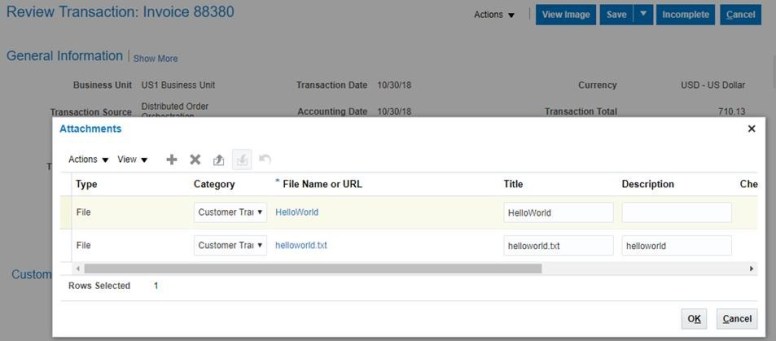
After import, we can see following file was attached to the AR Invoice
AR_Attachment

Integrate with Groovy and Camel

Groovy is an easy language for its simplicity and the strong support from Java.

And Camel is a popular integration framework that works perfectly for small to medium projects.

However, setting up Camel, especially in Java is a little complex, especially when you just need to do a Demo

This leads us to think of the option of using Groovy to work with Camel, and provide some simple solution.

Following is an example of how basic Camel framework can be set up in Groovy with only 20 lines – well, I did remove empty lines to make it look small 😉

And thanks to Groovy’s Grape dependency handling, it automatically grabs all the dependency packages for us — enables you to focus on the core transformation

Following code prints out a “Hello World!” string every 3 seconds

@Grab('org.apache.camel:camel-core:2.10.0')
@Grab('org.slf4j:slf4j-simple:1.6.6')
import org.apache.camel.*
import org.apache.camel.impl.*
import org.apache.camel.builder.*
def camelContext = new DefaultCamelContext()
camelContext.addRoutes(new RouteBuilder(){
def void configure(){
from("timer://jdkTimer?period=3000")
.to("log://camelLogger?level=INFO")
.process(new Processor(){
def void process(Exchange exchange){
println("Hello World!")
}
})
}
})
camelContext.start()
addShutdownHook{ camelContext.stop() }
synchronized(this){ this.wait() }

Groovy – get file from sftp

Following code shows how to use Groovy to download a file from sftp.

It uses package “com.jcraft”

Thanks to Groovy Grab, we don’t need to manually fetch the library ourselves.


@Grab(group='com.jcraft', module='jsch', version='0.1.46')
import com.jcraft.jsch.*

java.util.Properties config = new java.util.Properties()
config.put "StrictHostKeyChecking", "no"

JSch ssh = new JSch()
Session sess = ssh.getSession "USERNAME", "HOST", PORT

sess.with{
setConfig config
setPassword "PASSWORD"
connect()
Channel chan = openChannel "sftp"
chan.connect()

ChannelSftp sftp = (ChannelSftp) chan;
sftp.get("/DOWNLOADFOLDER/DOWNLOADFILENAME","c:/LOCALFOLDER/LOCALFILENAME")
sftp.rm("/DOWNLOADFOLDER/DOWNLOADFILENAME")
chan.disconnect()
disconnect()
}

Omni channel SCM – SalesForce Order Transform

Overview

This is a demo of SalesForce Order Transform, it simply uses java multi-threading and activemq(in google engine cloud) to simulate an full transformation process including message inbound, transformation and outbound.

The same transformation can easily migrate to different integration platforms, etc Apache Camel, MuleSoft or Oracle Integration Cloud, or simply use the UI tool to do the same

A summarize diagram on the whole process

This is part of the omni-channel supply chain demo

Suppose we have 2 Sales Order platform, 1 is SalesForce and 1 is Shopify, we can transform different Orders to a standard format (etc, Oracle Cloud format), and then import to ERP.

In this Demo we only transformed SalesForce Order, it will be similar to Shopify Order except we uses REST API to pull down the Order

Following are the parts covered in the Demo

  1. Get Orders from SalesForce using web service (Proxy Client)
  2. Transform SalesForce order to standard sales order format using xslt template
  3. Export to a folder – we can change this to import to Oracle ERP Cloud

Test Result

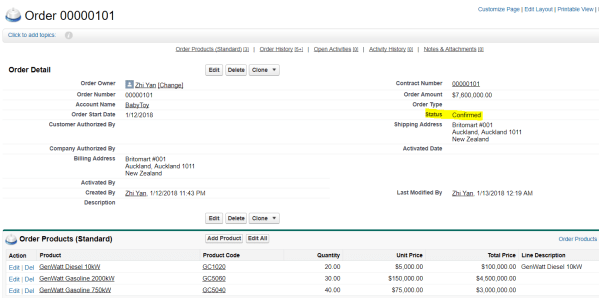
We create a new Order In SalesForce, and change its Status to ‘Confirmed’, since the program only pulls down orders that is ‘Confirmed’

After some time, the program automatically pull it down, transform it and put it to local folder

Detail of the project

Project Structure

We have 3 java classes implemented runnable interface

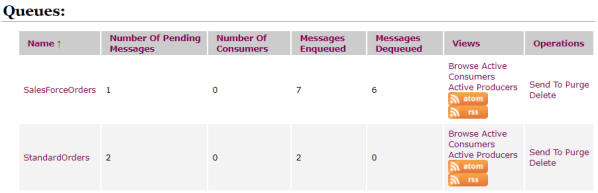
We use ActiveMQ for this project, 2 queues were created

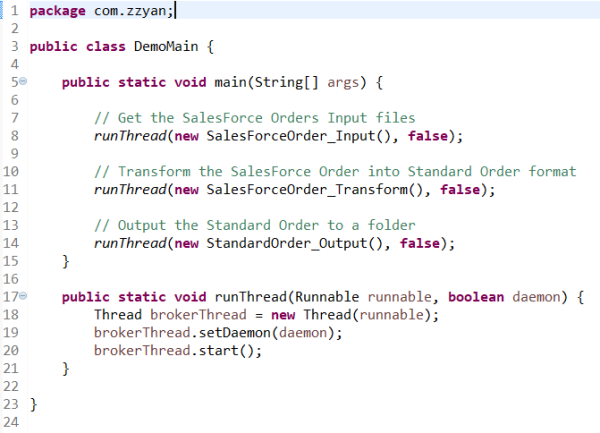
DemoMain.java

It starts 3 threads for the project

  1. SalesForceOrder_Input thread, it monitors the SalesForce system, pull down Orders with ‘Confirmed’ status and send to Queue “SalesForceOrders”
  2. SalesForceOrder_Transform thread, it fetch the files in Queue “SalesForceOrders”, uses xslt to transform the SalesForce Order to a standard sales order format, and send the output to Queue “StandardOrders”
  3. StandardOrder_Output thread, it fetches the Order file from Queue “StandardOrders”, and create the Order file in the file system

SalesForceOrder_Input.java

It pulls down the Order and put it to queue “SalesForceOrders”

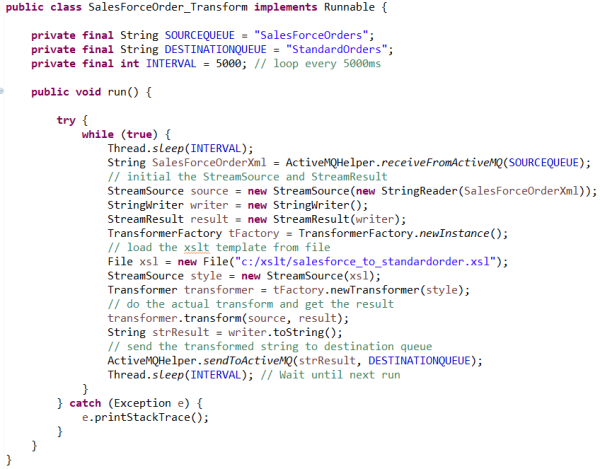
SalesForceOrder_Transform.java

This thread transforms the file using following xslt and files

Transform Detail

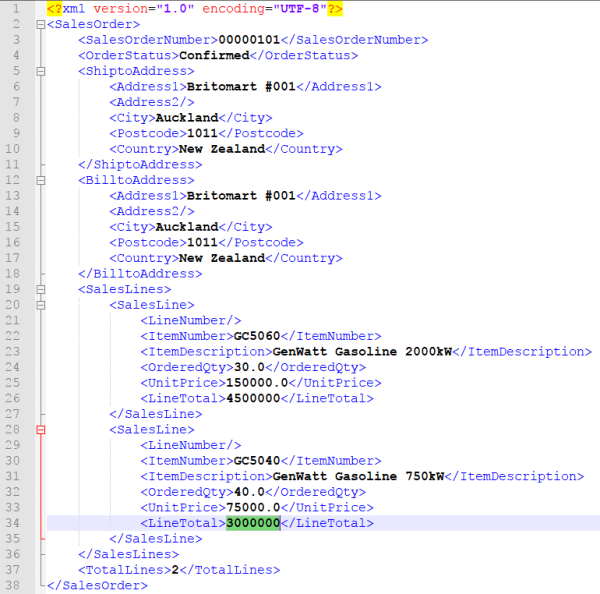
Following is the standard sales order format we want to convert to

We create a xslt template based on the standard sales order format

Inside the xslt template, we do followings

  1. We defined a variable ‘LinesCount’, and used xpath to calculate the total lines after transform, note we ignored Item ‘GC1020’
  2. We defined a loop to loop each Item, but ignored ‘GC1020’, suppose it’s a price only SKU and we don’t want it in the order to warehouse
  3. We used a multiply function to calculate the LineTotal
  4. We output the ‘LinesCount’ variable

After transformation, we got following output, which is same as expectation

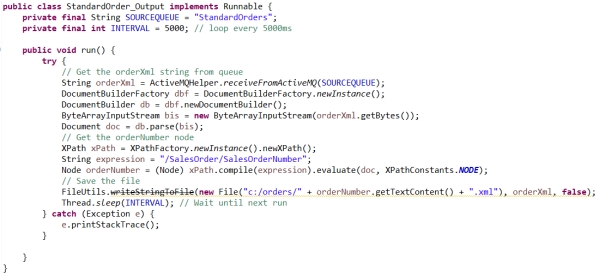
StandardOrder_Output.java

Fetch the transformed order from queue and save it to local system

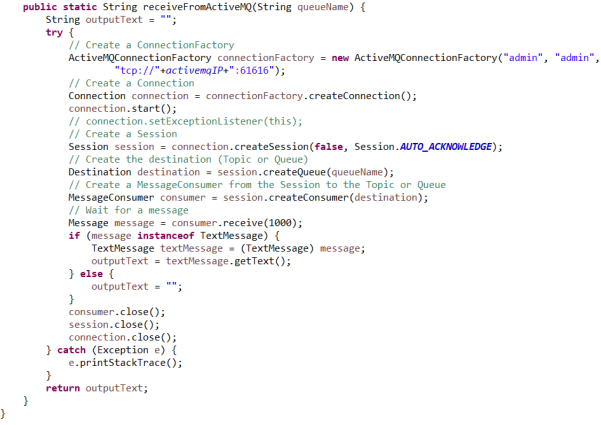
ActiveMQHelper.java

Help to send message and get message from ActiveMQ