Camel – Unmarshal Csv to Java POJO

This document shows how to do following:

  1. Get a csv from a local folder,
  2. Unmarshal it to a Java pojo object array
  3. Split the array to each object
  4. Handle each pojo object by a customized code

Following is the pojo definition with camel csv format annotations


package com.zzyan.domain;

import org.apache.camel.dataformat.bindy.annotation.CsvRecord;
import org.apache.camel.dataformat.bindy.annotation.DataField;

@CsvRecord(separator = ",", skipFirstLine = true)
public class Item {

    @DataField(pos=1)
    private String transactionType;

    @DataField(pos=2)
    private String sku;

    @DataField(pos=3)
    private String itemDescrition;

    @DataField(pos=4)
    private String price;

/*
    here ignores all the getter and setters
*/

    @Override
    public String toString() {
        return "Item{" +
                "transactionType='" + transactionType + '\'' +
                ", sku='" + sku + '\'' +
                ", itemDescrition='" + itemDescrition + '\'' +
                ", price='" + price + '\'' +
                '}';
    }
}

We also define a customized processor, the processor will take in 1 Item object, and do some handling. Here we do nothing but just print it out.


package com.zzyan.processor;

import com.zzyan.domain.Item;
import lombok.extern.slf4j.Slf4j;
import org.apache.camel.Exchange;
import org.springframework.stereotype.Component;

@Component
@Slf4j
public class ItemProcessor implements org.apache.camel.Processor {
    @Override
    public void process(Exchange exchange) throws Exception {
        Item item = (Item)exchange.getIn().getBody();
        System.out.println(item.getItemDescrition());
    }
}

Finally we define the Camel Route to link these together.


package com.zzyan.route;

import com.zzyan.domain.Item;
import com.zzyan.processor.ItemProcessor;
import org.apache.camel.builder.RouteBuilder;
import org.apache.camel.dataformat.bindy.csv.BindyCsvDataFormat;
import org.apache.camel.spi.DataFormat;
import org.springframework.stereotype.Component;

//@Component
public class UnmarshalCsvRoute extends RouteBuilder {
    @Override
    public void configure() throws Exception {

        DataFormat bindy = new BindyCsvDataFormat(Item.class);

        from("timer:hello?period=10s")
                .log("Timer Invoked and the body is ${body}")
                .pollEnrich("file:c:/data/input?noop=true&readLock=none")
                .log("body: ${body}")
                .unmarshal(bindy)
                .log("The unmarshaled object is ${body}")
                .split(body())
                  .log("new Item ${body}")
                  .process(new ItemProcessor())
                .end();
    }
}

Put the csv file with the same header to c:/data/input folder, and run the spring boot project, the Route will pickup the file and do the transformation.


Camel – Fetch file from sftp and unzip

In real time integration, especially file based integration, we normally starts from fetching file from a sftp server.

It’s common that the files put on the sftp server is a zipped file with multiple files compressed together.

Following shows how to use a Camel route to fetch a zip file from the sftp server, and after that unzip the file and put to local folders.

Please refer to Spring boot + Camel hello world to see how to setup the project before creating the Route.

The code contains both getting file from a sftp, and fetch from a local folder(commented). It also includes a Choice to do the file filtering and switch to different sub-Routes if required.


package com.zzyan.route;

import org.apache.camel.Predicate;
import org.apache.camel.builder.PredicateBuilder;
import org.apache.camel.builder.RouteBuilder;
import org.apache.camel.model.dataformat.ZipFileDataFormat;
import org.springframework.stereotype.Component;

import java.util.Iterator;

//@Component
public class UnzipRoute extends RouteBuilder {
    @Override
    public void configure() throws Exception {

        // Define a Zip File format, since our Zip file have multiple zip files
        ZipFileDataFormat zipFile = new ZipFileDataFormat();
        zipFile.setUsingIterator(true);

        from("timer:hello?period=10s") // Triggered by Timer every 10 seconds
                .log("Timer Invoked and the body is ${body}")
                .pollEnrich("sftp://USERNAME@HOST/FILEPATH?password=PASSWORD&noop=true")
				// following shows pull the file from local c:/data/zipInput
                //.pollEnrich("file:c:/data/zipInput?noop=true&readLock=none")
                .log("${file:name}")
                .unmarshal(zipFile)
                .split(bodyAs(Iterator.class)).streaming()
                  .log("${file:name}")
                  .choice()
                    .when(header("CamelFileName").startsWith("Headers"))
                      .log("This is the Header")
                      .to("file:c:/data/output")
                    .otherwise()
                      .to("file:c:/data/output")
                  .endChoice()
                .end();
    }
}


How can Java run Groovy script dynamically 2

This is a continue with the previous blog “How can Java run Groovy script dynamically”.

We try to do some complex things inside the groovy script, this time we tried to define a data structure directly inside the script, and see if the GroovyShell can identify it at run time and run correctly

Following are the sample script that passed to the GroovyShell

The code refers to “How to use a Groovy trait to output any class as csv?”

import java.io.ByteArrayInputStream
import java.io.Reader
import java.io.InputStreamReader
import static com.xlson.groovycsv.CsvParser.parseCsv

def sb = StringBuilder.newInstance()

/*
// TEST1 - simple CSV parsing
Reader inputReader = new InputStreamReader(new ByteArrayInputStream(input));
for(line in parseCsv(inputReader,separator:",")){
  // println line
  sb.append(line.attribute1+";"+line.attribute2)
  sb.append("\n")

}

output = sb.toString().getBytes()
*/

// TEST2 - Define data structure inside the dynamic script and gets output
def m = new MeetupMember()
m.name = "Sergio del Amo"
m.locality = "Guadalajara"
m.twitter = "https://twitter.com/sdelamo"
m.facebook = null
m.tumblr = null
m.imageUrl = "http://photos4.meetupstatic.com/photos/member/c/d/6/b/member_254392587.jpeg"
m.website = "http://www.meetup.com/es-ES/Warsaw-Groovy-User-Group/members/200767921/"

output = m.asCSV().getBytes()

// Following are the data structure definition
// You can see that this part is at the end of the script
// But GroovyShell handle it correctly
trait TraitAsCSV {
// manually provide the header to make sure the csv output is in the expected sequence
   List<String> propertyNames() {
        return ["name","locality","twitter","facebook","tumblr","background","imageUrl","website"]
    }

    String csvHeaders() {
        propertyNames().join(delimiter())
    }

    String asCSV() {
        def str = ""
        def arr = []
        for(def propName in propertyNames()) {
            def v = this."$propName"
            arr <<  (v ?: "")
        }
        arr.join(delimiter())
    }

    static String delimiter() {
     ";"
    }
}
class MeetupMember implements TraitAsCSV {
    String name
    String locality
    String twitter
    String facebook
    String tumblr
    String background
    String imageUrl
    String website
}

Spring boot + Camel hello world

This post shows how to create a helloworld by using Spring boot and Camel from scratch. It covers following 2 examples:
1. Create a Camel route to pring a “hello world” message
2. Create a Camel route to move files from folder1 to folder2

Spring boot is an easy way to create an app. Its Dependency Injection makes it especially easy to create Camel Routes.

Following are the overall steps that we need to go through for this – we use Gradle to compile in this example.
1. Goto Spring Initializr to create a Spring project with Gradle, Java, Camel option.
2. Add Camel Main run controller setting property and test
3. Create a new HelloWorld Route for the printing of “hello world” message and test
4. Create a new route to move files from folder1 to folder2 and test

Following are the key steps related:
1. Create a Spring Project using Spring Initializr:
We go to the web site and select following options to create and press “Generate Project”.
The Spring Initializr will download the project with the Camel dependency for us as a Zip
Download the zip file and unzip it locally to your PC
CreateSpringCamelProject

2. We now add a Camel Main controller setting to file “HelloCamel\src\main\resources\application.properties”, this will keep the Camel Main thread running rather than exit immediately.
# camel main loop setup
camel.springboot.main-run-controller=true

You can go to folder HelloWorld and try to run “gradle bootRun” after the setting, it should show following output, this means the camel started correctly – you can use “ctrl+c” to cancel the running afterward.
TestRun

3. We now create a HelloWorld Route to print some hello world output. Add a new folder “route” under folder “HelloCamel\src\main\java\com\zzyan\HelloCamel”, and then add a new file “Route1_HelloWorld.java” inside it.
Please note the @Component command, this tells Spring Boot it’s a spring managed bean, spring will initialize it at run time.
Paste following codes to the file and try to run it with “gradle bootRun”

import org.apache.camel.builder.RouteBuilder;
import org.apache.camel.Processor;
import org.apache.camel.Exchange;
import org.springframework.stereotype.Component;
@Component
class Route1_HelloWorld extends RouteBuilder{
@Override
public void configure() throws Exception{
from("timer://jdkTimer?period=3000")
.to("log://camelLogger?level=INFO")
.log("Hello World");
}
}

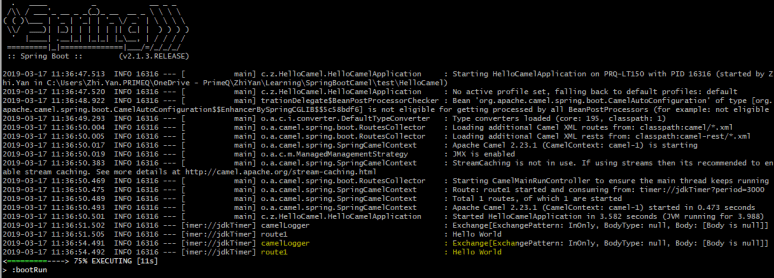
It should show following info, the Hello World message is print out correctly
HelloWorld

4. We try to add another route to the project, moves files from folder1 to folder2. Add a new file “Route2_FileTransfer.java” with following codes, PLEASE change the 2 folder names to your own.

package com.zzyan.HelloCamel.route;
import org.springframework.boot.SpringApplication;
import org.springframework.boot.autoconfigure.SpringBootApplication;
import org.apache.camel.builder.RouteBuilder;
import org.apache.camel.Processor;
import org.apache.camel.Exchange;
import org.springframework.stereotype.Component;
@Component
class Route2_FileTransfer extends RouteBuilder{
@Override
public void configure() throws Exception{
from("file:C:/camel_test1?noop=true").to("file:C:/camel_test2");
}
}


put a file in folder1, in my case it’s c:/camel_test1
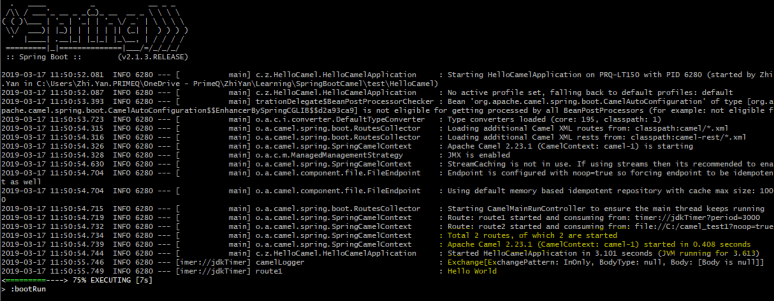
run the project by “gradle bootRun”, and it should show both Routes are running.
it shows 2 routes are running now
FileTransfer

check the folder2 folder in your own PC, it should copy all the files from folder1 to folder2:

CopiedFile

If both tests work fine, congratulation, you have successfully used Spring boot and Camel to create 2 Routes.

You can continue to create more Routes with specific requirements – transform files, unmarshal csv etc, with the help of Camel, this would be straightforward.

You can also containerize the project to deploy it as a microservice to a cloud platform, which will be covered later in the blog.