How to get employee info in Oracle HCM

Using following code can get the employee information in Oracle HCM, in real time, what we can do is to use this as a data feed, and bulk update the employee information using some scripting language

select pu.user_id, papf.person_id, pu.user_guid, papf.person_number, pu.username, pea.email_address
from per_all_people_f papf, per_users pu, per_email_addresses pea
where papf.person_id = pu.person_id
and pu.person_id = pea.person_id

How to get the PO import Errors

Use following sql script to get the PO import errors.

Same sql can be created as a bi publisher report, and schedule to deliver the output to the key user daily.

SELECT
a.batch_id,
a.INTERFACE_HEADER_KEY,
a.BILLTO_BU_NAME,
a.PRC_BU_NAME,
a.REQ_BU_NAME,
a.DOCUMENT_NUM,
a.AGENT_NAME,
a.VENDOR_NAME,
a.VENDOR_SITE_CODE,
a.LOAD_REQUEST_ID,
b.COLUMN_NAME,
b.COLUMN_VALUE,
b.ERROR_MESSAGE,
b.ERROR_MESSAGE_NAME,
b.TABLE_NAME
FROM  PO_Headers_Interface a,
PO_Interface_Errors b
WHERE 1 = 1
AND a.INTERFACE_HEADER_ID = b.INTERFACE_HEADER_ID
AND b.ERROR_MESSAGE  !=  'The order number must be unique in a sold-to legal entity. '
and a.request_id = :request_id

How to get Suppliers Import Errors

When triggers the supplier import for Procurement Cloud, we need to check the import errors.

It’s tedious to check the standard pdf report generated by the import process.

Instead, we can create following reports and schedule it to run daily, to delivery the errors to a key user to check the detail issue.


-- Rejection for Supplier Header
select rej.REJECT_LOOKUP_CODE, sup.* from POZ_SUPPLIER_INT_REJECTIONS rej, POZ_SUPPLIERS_INT sup
where rej.request_id = :request_id
and rej.reject_lookup_code not like 'Supplier Number%already exists. Review the supplier numbering setup.%'
and rej.reject_lookup_code not like 'A record with the value%already exists. Enter a unique value.%'
and rej.PARENT_ID = sup.VENDOR_INTERFACE_ID

-- Rejection for Supplier Addresses
select rej.REJECT_LOOKUP_CODE, adr.* from POZ_SUPPLIER_INT_REJECTIONS rej, POZ_SUP_ADDRESSES_INT adr
where rej.request_id = :request_id
and rej.reject_lookup_code not like 'The value already exists. You must provide a unique value.'
and rej.PARENT_ID = adr.address_interface_id

-- Rejection for Supplier Sites
select rej.reject_lookup_code, site.* from POZ_SUPPLIER_INT_REJECTIONS rej, POZ_SUPPLIER_SITES_INT site
where rej.request_id = :request_id
and rej.PARENT_ID = site.VENDOR_SITE_INTERFACE_ID
and rej.reject_lookup_code not like 'The site name already exists in the given procurement business unit for the supplier indicated in the record.%'

-- Rejection for Site Assignments
select rej.REJECT_LOOKUP_CODE, ass.* from POZ_SUPPLIER_INT_REJECTIONS rej, POZ_SITE_ASSIGNMENTS_INT ass
where rej.request_id = :request_id
and rej.reject_lookup_code not like 'The assignment for the Client BU already exists for the given supplier, site, and procurement business unit combination indicated in the record%'
and rej.PARENT_ID = ass.ASSIGNMENT_INTERFACE_ID

-- IBY_TRANSACTION_ERRORS contains the detail error message for the Bank account import
-- Bank Account Import Errors
select * from IBY_TRANSACTION_ERRORS where creation_date > sysdate -1 and error_message not like 'The external bank account already exists. The details included in the interface table are ignored%'
and error_message not like 'The external payee already exists. The details included in the interface table are ignored%'

How to get Oracle ERP Cloud BI Publisher Reports by Groovy / Java

Sometimes we need to export some data from Oracle ERP / SCM Cloud.

However, Oracle didn’t provide us direct connections to the backend database.

There are 2 ways we can get the data back from ERP Cloud, one is through the web services (soap/restful) defined for different data objects, another is through the BI Publisher calls to export a data only report.

This blog shows how to use Groovy / Java to export a BI Publisher Report from Oracle ERP Cloud – Normally we will create some standalone reports within BI Publisher, and make its output to be csv only or xml only.

Following is the code that shows how to extract it.

The code uses standard apache http client package which can be found here: Apache HttpClient

import org.apache.http.HttpResponse;
import org.apache.http.client.ClientProtocolException;
import org.apache.http.client.HttpClient;
import org.apache.http.client.methods.HttpPost;
import org.apache.http.entity.StringEntity;
import org.apache.http.impl.client.HttpClientBuilder;
import com.sun.org.apache.xml.internal.security.utils.Base64;
import java.text.MessageFormat;


String url = "https://YOUR_ERP_CLOUD_ENVIRONMENT/xmlpserver/services/ExternalReportWSSService";
String authStr = "USERNAME:PASSWORD";
HttpClient client = HttpClientBuilder.create().build();
HttpPost post = new HttpPost(url);

// set credential
byte[] authBytes = authStr.getBytes("UTF-8");
String auth = Base64.encode(authBytes);
post.setHeader("Authorization", "Basic " + auth);
post.setHeader("Content-Type", "application/soap+xml;charset=UTF-8");

String payload =
	'''
	<soap:Envelope xmlns:pub="http://xmlns.oracle.com/oxp/service/PublicReportService" xmlns:soap="http://www.w3.org/2003/05/soap-envelope">
		<soap:Body>
			<pub:runReport>
				<pub:reportRequest>
					<pub:attributeFormat>xml</pub:attributeFormat>
					<pub:attributeLocale/>
					<pub:attributeTemplate/>
					<pub:reportAbsolutePath>/Custom/REPORT_PATH/REPORT_NAME.xdo</pub:reportAbsolutePath>
					<pub:sizeOfDataChunkDownload>-1</pub:sizeOfDataChunkDownload>
					<pub:parameterNameValues>
						<pub:item>
							<pub:label>PARAMETER1</pub:label>
							<pub:name>PARAMETER1</pub:name>
							<pub:values>
								<pub:item>{0}</pub:item>
							</pub:values>
						</pub:item>
					</pub:parameterNameValues>
				</pub:reportRequest>
				<pub:appParams/>
			</pub:runReport>
		</soap:Body>
	</soap:Envelope>
	'''

payload = MessageFormat.format(payload, "PARAMETER_VALUE");

post.setEntity(new StringEntity(payload));

// execute the request and get the response
HttpResponse response = client.execute(post);

// get the result, you can use apache IOUtils to convert the contents InputStream to string 
BufferedReader rd = new BufferedReader(new InputStreamReader(response.getEntity().getContent()));
StringBuffer result = new StringBuffer();
String line = "";
while ((line = rd.readLine()) != null) {
	result.append(line);
}
print( result.toString());


How to import attachments to Oracle ERP Cloud

Sometimes, when doing integration, we need to import attachments to Oracle ERP Cloud.

Oracle ERP Cloud have a common import framework for ERP/SCM Cloud.

We can find the attachment context using following SQL or Oracle Doc 2369923.1

SELECT * FROM FUN_ERP_ATTACHMENT_CONTEXTS

Take AR for example, we can get the SQL defined here for the AR attachment.
The :1, :2, :3, :4 are the keys we need to provide in the web service payload when calling the attachment service:

SELECT ARC.CUSTOMER_TRX_ID FROM RA_CUSTOMER_TRX_ALL ARC, RA_BATCH_SOURCES_ALL BS
WHERE
ORG_ID = (SELECT BU_ID FROM FUN_ALL_BUSINESS_UNITS_V WHERE BU_NAME = :1)
AND TRX_NUMBER = :2 AND ARC.BATCH_SOURCE_SEQ_ID = BS.BATCH_SOURCE_SEQ_ID
AND BS.SET_ID IN (FND_SetID_Utility.getSetID('AR_TRANSACTION_SOURCE','BU',ARC.ORG_ID), 0)
AND BS.NAME = :3 AND ARC.CUSTOMER_TRX_ID = NVL(:4, ARC. CUSTOMER_TRX_ID)

The import url is similar to following:
https://%5BYOUR_ERP_INSTANCE%5D:443/fscmService/ErpObjectAttachmentService

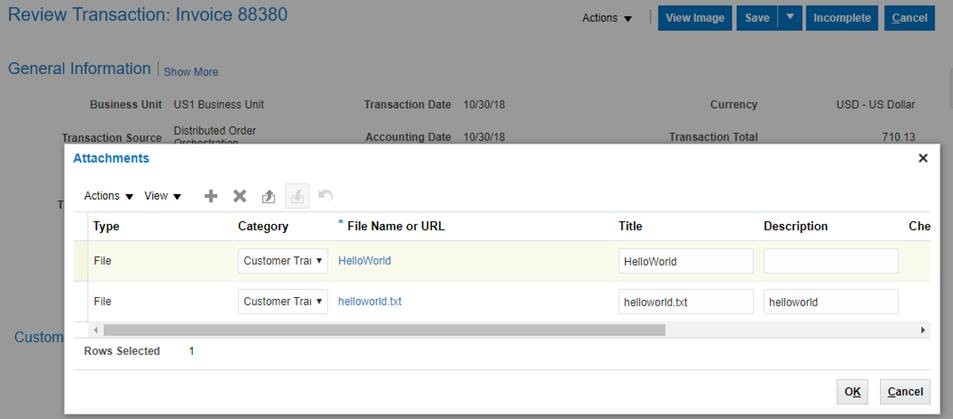
Following is an example of the payload that we use to import an attachment to an exiting AR Invoices – UserKeyB and UserKeyD needs be populate correctly for the system to find the existing Invoice. Also file contents are encoded to BASE64 string.

<soapenv:Envelope xmlns:soapenv="http://schemas.xmlsoap.org/soap/envelope/"
xmlns:typ="http://xmlns.oracle.com/apps/financials/commonModules/shared/model/erpIntegrationService/types/"
xmlns:erp="http://xmlns.oracle.com/apps/financials/commonModules/shared/model/erpIntegrationService/">
<soapenv:Header/>
<soapenv:Body>
<typ:uploadAttachment>
<typ:entityName>RA_CUSTOMER_TRX_ALL</typ:entityName>
<typ:categoryName>CUSTOMER_TRX</typ:categoryName>
<typ:allowDuplicate>yes</typ:allowDuplicate>
<!--Zero or more repetitions:-->
<typ:attachmentRows>
<!--Optional:-->
<erp:UserKeyA>US1 Business Unit</erp:UserKeyA>
<!--Optional:-->
<erp:UserKeyB>88380</erp:UserKeyB>
<!--Optional:-->
<erp:UserKeyC>Distributed Order Orchestration</erp:UserKeyC>
<!--Optional:-->
<erp:UserKeyD>667110</erp:UserKeyD>
<!--Optional:-->
<erp:UserKeyE></erp:UserKeyE>
<!--Optional:-->
<erp:AttachmentType>File</erp:AttachmentType>
<!--Optional:-->
<erp:Title>HelloWorld</erp:Title>
<!--Optional:-->
<erp:Content>aGVsbG93b3JsZA==</erp:Content>
</typ:attachmentRows>
</typ:uploadAttachment>
</soapenv:Body>
</soapenv:Envelope>

After import, we can see following file was attached to the AR Invoice
AR_Attachment

How to get a BU id

Using following SQL can get the BU id by BU name


SELECT hao.organization_id as bu_id,haot.name,hao.business_group_id
FROM
HR_ALL_ORGANIZATION_UNITS_F hao,HR_ORGANIZATION_UNITS_F_TL haot
WHERE
hao.ORGANIZATION_ID = haot.ORGANIZATION_ID
AND hao.EFFECTIVE_START_DATE = haot.EFFECTIVE_START_DATE
AND hao.EFFECTIVE_END_DATE = haot.EFFECTIVE_END_DATE
AND TRUNC(SYSDATE) BETWEEN hao.EFFECTIVE_START_DATE
AND hao.EFFECTIVE_END_DATEAND haot.LANGUAGE='US'
AND haot.name like '&BU_NAME%'